AI reply assistant for faster messaging in Chrome
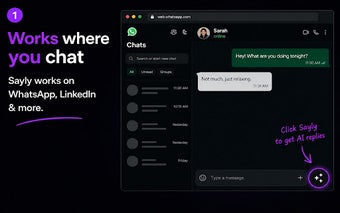
Sayly, developed by INNOFUN, is an AI-powered Chrome extension that helps users compose message replies quickly and confidently. The app uses advanced language models to produce multiple context-aware reply options and includes tone and relationship presets to match intent. Designed for integration with web messaging, Sayly targets busy professionals, job seekers, and active daters who want to reduce time spent drafting responses and ease reply anxiety.
What is Sayly used for?
Sayly is an AI reply assistant that creates concise, context-aware responses inside the browser. The tool uses advanced language models to return multiple suggestion options and applies relationship-specific logic to shape wording. Core capabilities include:
- Smart AI reply generation for short messages
- Tone customization such as Professional, Polite, Confident, Friendly
- Context modes for Work, Friends, Partners, Family, Clients
How does Sayly fit into a browser-based workflow?
The Chrome extension plugs into web messaging sites to provide help without switching tabs, described as a lightweight way to access AI assistance. The typical workflow is to paste a received message, pick a conversation context and tone, then review generated options. Mobile apps on iOS and Android extend access off desktop, so generated replies can be reviewed and copied while continuing conversations on other devices.
Is Sayly suitable for professional, high-stakes communication?
The app is positioned toward busy professionals and job seekers by aligning suggestions with intent and relationship type, which can speed workplace and client replies. Tone presets labeled Professional and Client context aim to produce appropriately formal phrasing. Sayly’s stated goal of preventing overthinking helps users find wording faster, though users should still review suggested phrasing before sending in legally or reputationally sensitive situations.
What limitations should users expect?
Sayly concentrates on short reply generation rather than long-form composition, so it is not a substitute for full email drafting or document writing. It is described as a relatively new entry in the AI assistant market, which may mean some workflow or feature gaps compared with longer-established competitors. The tool’s usefulness depends on users applying judgment to AI suggestions in ambiguous or complex conversations.
Practical choice for faster messaging when users verify outputs
Sayly suits communicators who need quicker response drafting and are comfortable checking AI suggestions before sending. Its relative newness is a trade-off for rapid reply assistance. Tip: trial Sayly in low-stakes threads to calibrate tone and confirm the assistant matches your voice before using it in important or sensitive exchanges.